喂饭级教程 —— 基于 OceanBase seekdb 构建 RAG 应用

📚 这篇教程里的每一步,你都可以用 seekdb 亲手复现!欢迎来 https://github.com/oceanbase/seekdb 跟着做,说不定两小时后你就拥有了自己的 RAG 应用呢~

本文又是一篇喂饭级教程,为大家展示通过 OceanBase seekdb 构建 RAG(检索增强生成)系统的详细步骤。

喂饭级教程 —— 基于 OceanBase seekdb 构建 RAG 应用

RAG 系统结合了检索系统和生成模型,可根据给定提示生成新文本。系统首先使用 seekdb 的原生向量搜索功能从语料库中检索相关文档,然后使用生成模型根据检索到的文档生成新文本。

前提条件

  • 已安装 Python 3.11 或以上版本
  • 已安装 uv
  • 已准备好 LLM API Key

准备工作

克隆代码

1
2
git clone https://github.com/oceanbase/pyseekdb.git
cd pyseekdb/demo/rag

设置环境

安装依赖

基础安装(适用于 defaultapi embedding 类型):

1
uv sync

本地模型(适用于 local embedding 类型):

1
uv sync --extra local

提示:

  • local 额外依赖包含 sentence-transformers 及相关依赖(约 2-3 GB)。
  • 如果您在中国大陆,可以使用国内镜像源加速下载:
    • 基础安装(清华源):uv sync --index-url https://pypi.tuna.tsinghua.edu.cn/simple
    • 基础安装(阿里源):uv sync --index-url https://mirrors.aliyun.com/pypi/simple
    • 本地模型(清华源):uv sync --extra local --index-url https://pypi.tuna.tsinghua.edu.cn/simple
    • 本地模型(阿里源):uv sync --extra local --index-url https://mirrors.aliyun.com/pypi/simple

设置环境变量

步骤一:复制环境变量模板

1
cp .env.example .env

步骤二:编辑 .env 文件,设置环境变量

本系统支持三种 Embedding 函数类型,您可以根据需求选择:

  1. default(默认,推荐新手使用)
    • 使用 pyseekdb 自带的 DefaultEmbeddingFunction(基于 ONNX)
    • 首次使用会自动下载模型,无需配置 API Key
    • 适合本地开发和测试
  2. local(本地模型)
    • 使用自定义的 sentence-transformers 模型
    • 需要安装 sentence-transformers
    • 可配置模型名称和设备(CPU/GPU)
  3. api(API 服务)
    • 使用 OpenAI 兼容的 Embedding API(如 DashScope、OpenAI 等)
    • 需要配置 API Key 和模型名称
    • 适合生产环境

以下使用通义千问作为示例(使用 api 类型):

1
2
3
4
5
6
7
8
9
10
11
12
13
14
15
16
17
18
19
20
21
# Embedding Function 类型:api, local, default
EMBEDDING_FUNCTION_TYPE=api

# LLM 配置(用于生成答案)
OPENAI_API_KEY=sk-your-dashscope-key
OPENAI_BASE_URL=https://dashscope.aliyuncs.com/compatible-mode/v1
OPENAI_MODEL_NAME=qwen-plus

# Embedding API 配置(仅在 EMBEDDING_FUNCTION_TYPE=api 时需要)
EMBEDDING_API_KEY=sk-your-dashscope-key
EMBEDDING_BASE_URL=https://dashscope.aliyuncs.com/compatible-mode/v1
EMBEDDING_MODEL_NAME=text-embedding-v4

# 本地模型配置(仅在 EMBEDDING_FUNCTION_TYPE=local 时需要)
SENTENCE_TRANSFORMERS_MODEL_NAME=all-mpnet-base-v2
SENTENCE_TRANSFORMERS_DEVICE=cpu

# seekdb 配置
SEEKDB_DIR=./data/seekdb_rag
SEEKDB_NAME=test
COLLECTION_NAME=embeddings

环境变量说明:

变量名 说明 默认值/示例值 必需条件
EMBEDDING_FUNCTION_TYPE Embedding 函数类型 default(可选:apilocaldefault 必须设置
OPENAI_API_KEY LLM API Key(支持 OpenAI、通义千问等兼容服务) - 必须设置(用于生成答案)
OPENAI_BASE_URL LLM API 基础 URL https://dashscope.aliyuncs.com/compatible-mode/v1 可选
OPENAI_MODEL_NAME 语言模型名称 qwen-plus 可选
EMBEDDING_API_KEY Embedding API Key - EMBEDDING_FUNCTION_TYPE=api 时必需
EMBEDDING_BASE_URL Embedding API 基础 URL https://dashscope.aliyuncs.com/compatible-mode/v1 EMBEDDING_FUNCTION_TYPE=api 时可选
EMBEDDING_MODEL_NAME Embedding 模型名称 text-embedding-v4 EMBEDDING_FUNCTION_TYPE=api 时必需
SENTENCE_TRANSFORMERS_MODEL_NAME 本地模型名称 all-mpnet-base-v2 EMBEDDING_FUNCTION_TYPE=local 时可选
SENTENCE_TRANSFORMERS_DEVICE 运行设备 cpu EMBEDDING_FUNCTION_TYPE=local 时可选
SEEKDB_DIR seekdb 数据库目录 ./data/seekdb_rag 可选
SEEKDB_NAME 数据库名称 test 可选
COLLECTION_NAME 嵌入表名称 embeddings 可选

提示:

  • 如果使用 default 类型,只需配置 EMBEDDING_FUNCTION_TYPE=default 和 LLM 相关变量即可。
  • 如果使用 api 类型,需要额外配置 Embedding API 相关变量。
  • 如果使用 local 类型,需要安装 sentence-transformers 库,并可选择配置模型名称。

主要使用的模块

初始化 LLM 客户端

我们通过加载环境变量来初始化 LLM 客户端:

1
2
3
4
5
6
def get_llm_client() -> OpenAI:
"""Initialize LLM client using OpenAI-compatible API."""
return OpenAI(
api_key=os.getenv("OPENAI_API_KEY"),
base_url=os.getenv("OPENAI_BASE_URL"),
)

创建数据库连接

1
2
3
4
5
6
7
8
def get_seekdb_client(db_dir: str = "./seekdb_rag", db_name: str = "test"):
"""Initialize seekdb client (embedded mode)."""
cache_key = (db_dir, db_name)
if cache_key not in _client_cache:
print(f"Connecting to seekdb: path={db_dir}, database={db_name}")
_client_cache[cache_key] = Client(path=db_dir, database=db_name)
print("seekdb client connected successfully")
return _client_cache[cache_key]

自定义嵌入模型的工厂模式

.env 文件中可以通过配置 EMBEDDING_FUNCTION_TYPE 使用不同的 embedding_function。您也可以参考这个例子自定义您的 embedding_function

1
2
3
4
5
6
7
8
9
10
11
12
13
14
15
16
17
18
19
20
21
22
23
24
25
26
27
28
29
30
31
32
33
34
35
36
37
38
39
40
41
42
43
44
45
46
47
48
49
50
51
52
53
54
55
56
57
58
59
60
61
62
63
64
65
66
67
68
69
70
71
72
73
74
75
76
77
78
79
80
81
82
83
84
85
86
87
88
89
90
91
92
93
94
95
96
97
98
99
100
101
102
103
104
105
106
107
108
109
110
111
112
113
114
115
116
117
118
119
120
121
122
123
124
125
126
127
128
129
130
131
132
133
134
135
136
137
138
139
140
141
142
143
144
145
146
147
148
149
150
151
152
153
154
155
156
157
158
159
160
161
162
163
164
165
from pyseekdb import EmbeddingFunction, DefaultEmbeddingFunction
from typing import List, Union
import os
from openai import OpenAI

Documents = Union[str, List[str]]
Embeddings = List[List[float]]

class SentenceTransformerCustomEmbeddingFunction(EmbeddingFunction[Documents]):
"""
A custom embedding function using sentence-transformers with a specific model.
"""

def __init__(self, model_name: str = "all-mpnet-base-v2", device: str = "cpu"): # TODO: your own model name and device
"""
Initialize the sentence-transformer embedding function.

Args:
model_name: Name of the sentence-transformers model to use
device: Device to run the model on ('cpu' or 'cuda')
"""
self.model_name = model_name or os.environ.get('SENTENCE_TRANSFORMERS_MODEL_NAME')
self.device = device or os.environ.get('SENTENCE_TRANSFORMERS_DEVICE')
self._model = None
self._dimension = None

def _ensure_model_loaded(self):
"""Lazy load the embedding model"""
if self._model is None:
try:
from sentence_transformers import SentenceTransformer
self._model = SentenceTransformer(self.model_name, device=self.device)
# Get dimension from model
test_embedding = self._model.encode(["test"], convert_to_numpy=True)
self._dimension = len(test_embedding[0])
except ImportError:
raise ImportError(
"sentence-transformers is not installed. "
"Please install it with: pip install sentence-transformers"
)

@property
def dimension(self) -> int:
"""Get the dimension of embeddings produced by this function"""
self._ensure_model_loaded()
return self._dimension

def __call__(self, input: Documents) -> Embeddings:
"""
Generate embeddings for the given documents.

Args:
input: Single document (str) or list of documents (List[str])

Returns:
List of embedding vectors
"""
self._ensure_model_loaded()

# Handle single string input
if isinstance(input, str):
input = [input]

# Handle empty input
if not input:
return []

# Generate embeddings
embeddings = self._model.encode(
input,
convert_to_numpy=True,
show_progress_bar=False
)

# Convert numpy arrays to lists
return [embedding.tolist() for embedding in embeddings]


class OpenAIEmbeddingFunction(EmbeddingFunction[Documents]):
"""
A custom embedding function using Embedding API.
"""

def __init__(self, model_name: str = "", api_key: str = "", base_url: str = ""):
"""
Initialize the Embedding API embedding function.

Args:
model_name: Name of the Embedding API embedding model
api_key: Embedding API key (if not provided, uses EMBEDDING_API_KEY env var)
"""
self.model_name = model_name or os.environ.get('EMBEDDING_MODEL_NAME')
self.api_key = api_key or os.environ.get('EMBEDDING_API_KEY')
self.base_url = base_url or os.environ.get('EMBEDDING_BASE_URL')
self._dimension = None
if not self.api_key:
raise ValueError("Embedding API key is required")

def _ensure_model_loaded(self):
"""Lazy load the Embedding API model"""
try:
client = OpenAI(
api_key=self.api_key,
base_url=self.base_url
)
response = client.embeddings.create(
model=self.model_name,
input=["test"]
)
self._dimension = len(response.data[0].embedding)
except Exception as e:
raise ValueError(f"Failed to load Embedding API model: {e}")

@property
def dimension(self) -> int:
"""Get the dimension of embeddings produced by this function"""
self._ensure_model_loaded()
return self._dimension

def __call__(self, input: Documents) -> Embeddings:
"""
Generate embeddings using Embedding API.

Args:
input: Single document (str) or list of documents (List[str])

Returns:
List of embedding vectors
"""
# Handle single string input
if isinstance(input, str):
input = [input]

# Handle empty input
if not input:
return []

# Call Embedding API
client = OpenAI(
api_key=self.api_key,
base_url=self.base_url
)
response = client.embeddings.create(
model=self.model_name,
input=input
)

# Extract Embedding API embeddings
embeddings = [item.embedding for item in response.data]
return embeddings


def create_embedding_function() -> EmbeddingFunction:
embedding_function_type = os.environ.get('EMBEDDING_FUNCTION_TYPE')
if embedding_function_type == "api":
print("Using OpenAI Embedding API embedding function")
return OpenAIEmbeddingFunction()
elif embedding_function_type == "local":
print("Using SentenceTransformer embedding function")
return SentenceTransformerCustomEmbeddingFunction()
elif embedding_function_type == "default":
print("Using Default embedding function")
return DefaultEmbeddingFunction()
else:
raise ValueError(f"Unsupported embedding function type: {embedding_function_type}")

创建 Collection

get_or_create_collection() 方法中我们传入了 embedding_function,之后使用这个 collection 的 add()query() 方法的时候就不需要传入向量了,只需传入文本,向量会由 embedding_function 自动生成。

1
2
3
4
5
6
7
8
9
10
11
12
13
14
15
16
17
18
19
20
21
22
23
24
25
26
27
28
29
30
def get_seekdb_collection(client, collection_name: str = "embeddings",
embedding_function: Optional[EmbeddingFunction] = DefaultEmbeddingFunction(),
drop_if_exists: bool = True):
"""
Get or create a collection using pyseekdb's get_or_create_collection.

Args:
client: seekdb client instance
collection_name: Name of the collection
embedding_function: Embedding function (required for automatic embedding generation)
drop_if_exists: Whether to drop existing collection if it exists

Returns:
Collection object
"""
if drop_if_exists and client.has_collection(collection_name):
print(f"Collection '{collection_name}' already exists, deleting old data...")
client.delete_collection(collection_name)

if embedding_function is None:
raise ValueError("embedding_function is required")

# Use pyseekdb's native get_or_create_collection
collection = client.get_or_create_collection(
name=collection_name,
embedding_function=embedding_function
)

print(f"Collection '{collection_name}' ready!")
return collection

核心插入数据函数

1
2
3
4
5
6
7
8
9
10
11
12
13
14
15
16
17
18
19
20
21
22
23
24
25
def insert_embeddings(collection, data: List[Dict[str, Any]]):
"""
Insert data into collection. Embeddings are automatically generated by collection's embedding_function.

Args:
collection: Collection object (must have embedding_function configured)
data: List of data dictionaries containing 'text', 'source_file', 'chunk_index'
"""
try:
ids = [f"{item['source_file']}_{item.get('chunk_index', 0)}" for item in data]
documents = [item['text'] for item in data]
metadatas = [{'source_file': item['source_file'],
'chunk_index': item.get('chunk_index', 0)} for item in data]

# Collection's embedding_function will automatically generate embeddings from documents
collection.add(
ids=ids,
documents=documents,
metadatas=metadatas
)

print(f"Inserted {len(data)} items successfully")
except Exception as e:
print(f"Error inserting data: {e}")
raise

向量相似度搜索

1
2
3
4
5
results = collection.query(
query_texts=[question],
n_results=3,
include=["documents", "metadatas", "distances"]
)

统计 Collection 中的数据情况

1
2
3
4
5
6
7
8
9
10
11
12
13
14
15
16
def get_database_stats(collection) -> Dict[str, Any]:
"""Get statistics about the collection."""
try:
results = collection.get(limit=10000, include=["metadatas"])
ids = results.get('ids', []) if isinstance(results, dict) else []
metadatas = results.get('metadatas', []) if isinstance(results, dict) else []

unique_files = {m.get('source_file') for m in metadatas if m and m.get('source_file')}

return {
"total_embeddings": len(ids),
"unique_source_files": len(unique_files)
}
except Exception as e:
print(f"Error getting database stats: {e}")
return {"total_embeddings": 0, "unique_source_files": 0}

构建 RAG 系统

本模块实现了 RAG 系统的检索功能。通过将用户提出的问题转换为嵌入向量,利用 seekdb 提供的原生向量搜索能力,快速检索出与问题最相关的文档片段,为后续的生成模型提供必要的上下文信息。

导入数据

我们使用 pyseekdb 的 SDK 文档作为示例,您也可以使用自己的 Markdown 文档或者目录。

运行数据导入脚本:

1
2
3
4
5
# 导入单个文档
uv run python seekdb_insert.py ../../README.md

# 或导入目录下的所有 Markdown 文档
uv run python seekdb_insert.py path/to/your_dir

启动应用

pyseekdb/demo/rag 路径下执行如下命令,通过 Streamlit 启动应用:

1
uv run streamlit run seekdb_app.py --server.port your_port

使用 IP 和端口号(默认为 8501,可通过 --server.port 选项自定义)即可在浏览器中打开 RAG 界面。

提示:如果使用 uv 作为包管理器,请在命令前加上 uv run 前缀,以确保使用正确的 Python 环境和依赖。

喂饭级教程 —— 基于 OceanBase seekdb 构建 RAG 应用

实际运行示例

以下是一个真实的查询示例,展示了 seekdb RAG 系统的实际效果:

用户问题:”What is seekdb’s vector search?”

检索到的相关文档:

1
2
3
4
5
6
7
8
1. 30.experience-vector-retrieval.md
Vector search overview In today's era of information explosion, users often need to quickly retrieve the information they need from massive amounts o...

2. 20.using-seekdb-in-python-mode.md
Experience vector search SeekDB supports up to 16,000 dimensions of float-type dense vectors, sparse vectors, and various types of vector distance ca...

3. 70.experience-hybrid-vector-index.md
Summary Through this tutorial, you have mastered the core features of SeekDB's hybrid vector index: Simplified usage process: Achieve semantic ret...

使用 LLM 生成的答案:

SeekDB’s vector search is a powerful feature that enables efficient and accurate retrieval of data by encoding various types of data—such as text, images, and audio—into mathematical vectors and performing searches in a vector space. This approach captures deep semantic relationships within the data, going beyond traditional keyword-based search methods to deliver more relevant results.

Key capabilities of SeekDB’s vector search include:

  • High-dimensional vector support: It supports up to 16,000 dimensions for float-type dense vectors and sparse vectors.
  • Multiple distance metrics: It supports various similarity or distance calculations, including Manhattan distance, Euclidean distance, inner product, and cosine distance.
  • Advanced indexing methods: Vector indexes can be created using HNSW (Hierarchical Navigable Small World) or IVF (Iterative Virtual File), enabling fast approximate nearest neighbor searches.
  • Incremental updates: The system allows for real-time insertion and deletion of vectors without compromising search accuracy or recall.
  • Hybrid search with scalar filtering: Users can combine vector similarity search with traditional attribute-based (scalar) filtering for more precise results.
  • Flexible access interfaces: SeekDB supports SQL access via MySQL protocol clients in multiple programming languages, as well as a Python SDK.
  • Automatic embedding and hybrid indexing: With hybrid vector index features, users can store raw text directly—the system automatically converts it into vectors and builds indexes.

In summary, SeekDB’s vector search provides a comprehensive, high-performance solution for semantic search, particularly valuable in AI applications involving large-scale unstructured data.

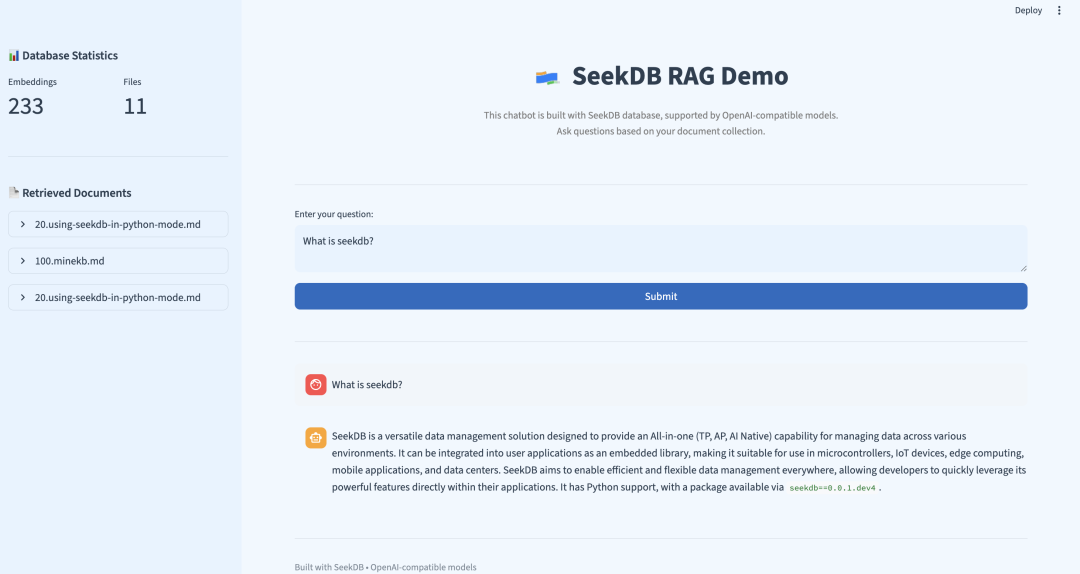
这个示例展示了:

  • ✅ 准确的信息检索:系统成功从文档中找到了相关信息
  • ✅ 多文档整合:从 3 个不同文档中提取和整合信息
  • ✅ 语义匹配:准确匹配了”vector search”相关的文档
  • ✅ 结构化回答:AI 将检索到的信息整理成清晰的结构
  • ✅ 完整性:涵盖了 seekdb 向量搜索的主要特性
  • ✅ 专业性:回答包含了技术细节和实际应用价值

检索质量分析:

  • 最相关文档:experience-vector-retrieval.md - 向量搜索概览
  • 技术细节:using-seekdb-in-python-mode.md - 具体的技术规格
  • 高级特性:experience-hybrid-vector-index.md - 混合向量索引功能

快速体验

如需快速体验 seekdb RAG 系统,请参考 快速部署

参考资料

  • [1] LLM API 基础 URL:https://dashscope.aliyuncs.com/compatible-mode/v1
  • [2] Embedding API 基础 URL:https://dashscope.aliyuncs.com/compatible-mode/v1
  • [3] 快速部署:https://github.com/oceanbase/pyseekdb/blob/main/demo/rag/README_CN.md
  • [4] seekdb 项目地址:https://github.com/oceanbase/seekdb